Beaver Themer: ACF Options Support Could Change EVERYTHING!!
October 13, 2018/
Important: The functionality shown here is probably not unique to ACF. Other custom field plugins like Pods could be worth checking if you are not a ACF user.
With the addition of custom field connections to colour fields in 2.2 this feature could be an incredible time saver for those who build websites professionally. It could also provide a great way for clients to be able to update global content like various contact details.
This code snippet need to be added to the child theme’s functions.php file:
// Adds an ACF Pro options page. It needs an ACF Field Group assigning to it.
if( function_exists('acf_add_options_page') ) {

	acf_add_options_page();

}
This adds an “Options” Menu item to your Dashboard navigation. The option page will then show any ACF field groups set with a rule under Locations to show on the options page. Use the ACF Color Picker Field.
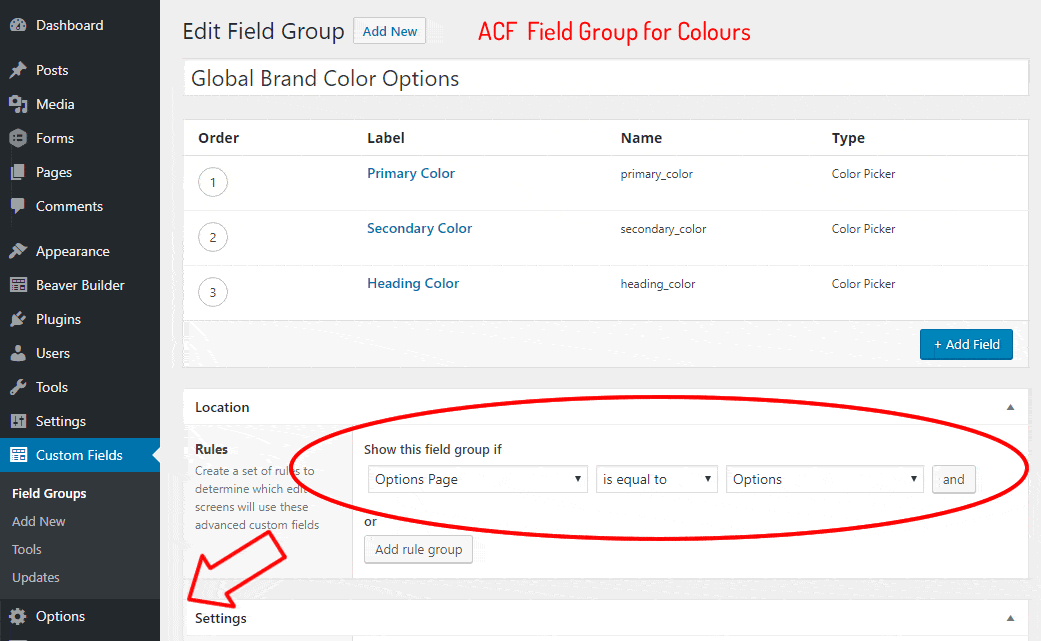
Note:
- You can set the order of Field Groups (Look for “Order no.” in the group setting).
- The options page is a feature of ACF Pro version.
- The ACF color picker does not support Alpha transparency.
- The “ACF RGBA Color Picker” plugin is not working with the Alpha version of Beaver Builder 2.2
Interesting Links.
- The “ACF Options Page Admin” plugin looks to have interesting options to layout the options page.
- And should there be any who don’t have Beaver Builder here is my affiliate link to them.
- My video example page.
Posted in Beaver Themer Tips